The top of my GitHub profile carries six animated cards, one per project. Each is a single SVG file with no script and no external resource, and each shows its product working rather than naming it. This is the guide to making one, written so that a person or a coding agent can follow it. I built the cards in a working session with Claude Code, and where a rule exists because something went wrong, the guide says what went wrong.
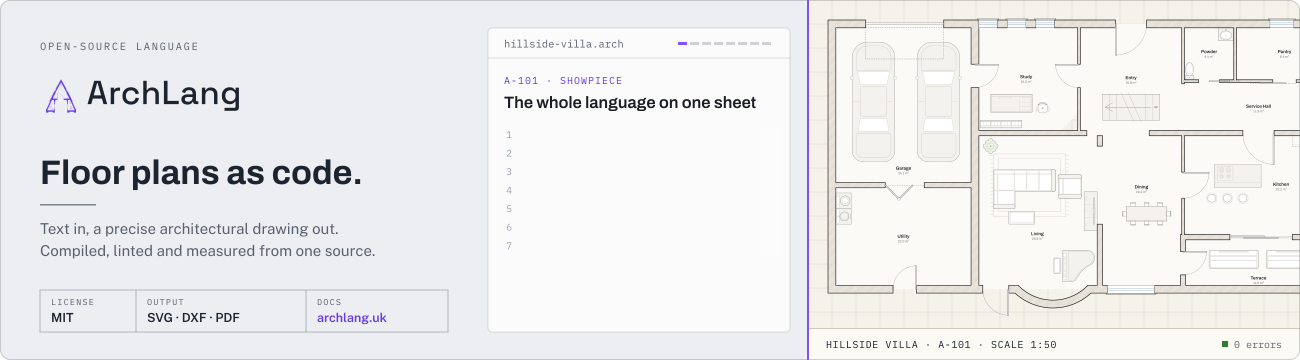
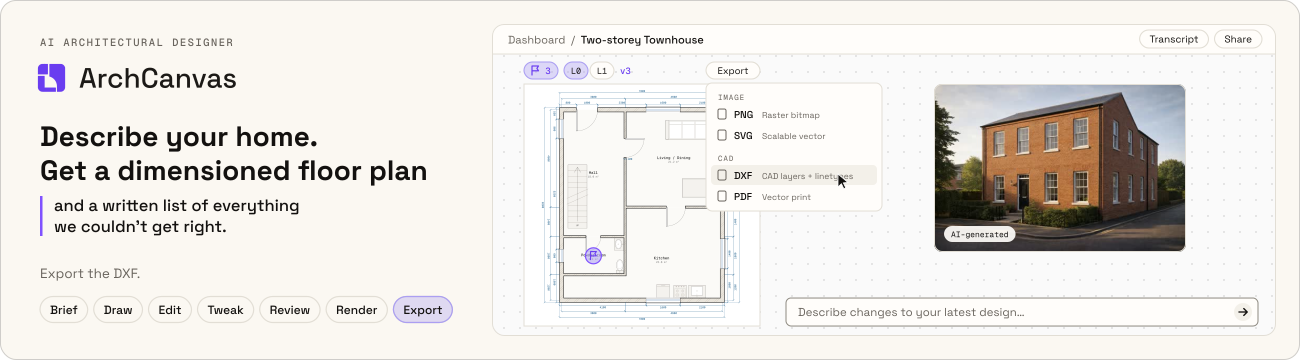
The code is in the profile repository, under scripts/cards/ and scripts/lib/svg-card/. Three of the cards, playing:

1. What a card is#
One self-contained SVG file, 1300 × 360, that plays inside an <img> tag on GitHub.
The left 500 px is an identity panel. The right 800 px is a stage where the product
does its job.
That last sentence is the whole idea. An animated name with drifting confetti is a business card. A card earns its place when the motion carries information: source code is typed and a floor plan compiles; an agent drafts, checks and fixes in passes; a phone scrolls a feed and an orchestrator's log reacts.
| Card | What the stage shows | Size | Loop |
|---|---|---|---|
| ArchLang | Eight capability sheets, each a real plan compiled at build time | 619 KB | 44.8 s |
| ArchCanvas | One studio session, brief to export | 305 KB | 38.8 s |
| GAVIGO IRE | A phone playing film frames beside a redrawn orchestration log | 495 KB | 9.8 s |
| She Sharp | What was built around the platform, ten strands of it, and whose history it is | 400 KB | 51.2 s |
| Eatropolis | Three things the site does, then what the delivery was held to | 288 KB | 21.6 s |
| FemTech Weekend | Three things the site does, then what stands behind it | 262 KB | 21.6 s |
2. The sandbox: what an SVG may do inside <img>#
GitHub renders a README image as a restricted image document. Verified on the live profile on 2026-10-07, light and dark:
| Works | Does not work |
|---|---|
CSS @keyframes in a <style> block |
JavaScript |
Inline style="animation-delay:…" on an element |
External fonts, stylesheets, images |
<use href="#id">, <clipPath>, <pattern>, gradients |
Anything fetched over the network |
A nested <svg> with its own viewBox |
Hover or click interaction |
<image href="data:image/jpeg;base64,…"> |
|
@media (prefers-reduced-motion: reduce) |
|
| Files of at least 619 KB |
Three consequences shape everything below: text must be outlines, pictures must be inlined, and every moving thing must be a CSS animation with its timing written into the file.
3. Draw it in the product's own design system#
A card is a picture of a product, so it looks like that product: its tokens, its typefaces, its wordmark, its layout habits. It does not look like the profile it sits on, and two cards for two products should not look alike.
Before drawing anything, read from the product's own repository:
- Colour tokens: the CSS variables or token file (
globals.css,tokens.css,variables.css, a Tailwind config). Copy hex values; never eyeball a screenshot. - Typefaces: the font loader (
next/fontcalls,@font-face, a TailwindfontFamily). If the site asks for system fonts, confirm it by readinggetComputedStyleon the live page. - The real wordmark: the SVG logo file, used as it is. Typing the product's
name in a similar font is not the wordmark. Recolour through
currentColoror afillswap only, and obey any brand rule the repo states. - Brand rules: a brand README, a design decision record, a claim-discipline file. They say what is forbidden, which a palette cannot tell you.
- Layout habits: how the product draws a kicker, a button, a card, a figure. Reuse one of its own patterns for your own content.
What this caught in practice:
- ArchLang's brand guide says there is no dark surface anywhere, that its retired pill chrome must not come back, and that red means attention only. The first ArchLang card had a black panel, pill chips and an orange underline. All three were wrong, and no amount of looking at the logo would have said so.
- She Sharp's first card was set in this profile's own display face. Its design system names three typefaces and a hero with two translucent discs and a mint full stop; the second card uses those.
- Eatropolis's name was first typed in the site's display font. The festival has a wordmark file. The second card uses it.
- FemTech Weekend's delivery figures are laid out in the pattern of that site's own kicker (a short rule, then spaced capitals); Eatropolis's are laid out like the site's own pricing strip. Borrowing a product's pattern for new content is what makes a new frame look native.
4. Nothing on the stage is drawn by hand#
The stage is evidence, so it is produced from the real thing at build time, and the build fails when the real thing stops agreeing.
- Compile it. ArchLang's eight drawings are example plans from the published npm package, compiled by the real compiler inside the card's build. A plan that stops compiling fails the build instead of shipping a stale picture.
- Quote it. The code beside each drawing is cut from that same source file by
pattern (
[/furniture piano/, 1]), so it cannot drift from what was compiled. - Ask it. Figures such as room counts, areas and lint findings come from the
compiler's own
describe()andlint()calls during the build, and the build asserts the count it expects. - Follow its script. ArchCanvas plays the product's own demo: the same brief, plans, edit command and interface strings the product's site plays.
- Cut it. Where a product film exists, stills and frames are cut from the film's master with ffmpeg. Where none exists, the windows are captures of the public site.
Two rules about what the picture may contain:
- Copy is cleared copy. Captions, chips and figures come from a source that was already reviewed: the film's copy file, the product's strings, the career database. A card is not the place to coin a new claim.
- Claims keep their caveats. A repository total sits on the same frame as the line that says another developer contributed. A proof metric sits beside the note that it is a controlled measurement and not a production SLA. If a product publishes rules about its own claims, they bind the card.
And one about what it must not contain: a person's face, a partner-logo wall, a price, a private repository's source text. Captures and stills are chosen to avoid them.
5. End on a frame about the work#
Each client card closes on a frame that says what the work was held to: a nine-day solo build, 39 of 39 accessibility tests, a load test at 1,000 concurrent visitors; or two platform generations and 538 of 570 commits with the remainder explained. The reader of a profile is deciding what the author can do. Show the product first, then say plainly what stood behind it, each figure with its basis in the same line.
That closing frame is also the still frame (section 7), so it is what a reader with motion turned off sees.
6. Techniques#
6.1 Text as shared glyph outlines#
No font loads inside <img>, so text becomes paths. Outlining a whole string as one
path works for a title and fails for a paragraph: nothing is reused. Instead, store
each glyph once in <defs>, in the font's own units, and place it with <use>:
<defs>
  <path id="_a01f" d="M79 0L79 730L289 730…"/>   <!-- one glyph, font units, y up -->
</defs>
<g fill="#1c2430" transform="translate(40 184) scale(0.034 -0.034)">
  <use href="#_a01f"/><use href="#_a02c" x="612"/><use href="#_a01f" x="1190"/>
</g>
The wrapper's scale(k, -k) converts font units to pixels and flips the y axis;
each <use x> is the running advance width plus kerning. A card with thousands of
characters costs a few dozen paths per font.
- Use static font instances. A variable font read with opentype.js gives its default instance, which may be Light.
- Keep glyph ids short. A card places thousands of
<use>elements and each repeats the id; shorteningdisplayReg-1ato_a01a, with one unused weight dropped, took 34 KB off one card. - When a font lacks a character (a diameter sign, an arrow), fall back per glyph to a second font with the same units-per-em.
- Outline the text of embedded drawings too. Compiler output arrives with
<text>elements; a small rewriter turns each into a glyph run, honouringtext-anchor,font-weight,dominant-baselineandtransform. - Outlined text is not readable by a screen reader. Put the full sentence in the
SVG's
<title>and reuse it as the image'salt.
Implementation: scripts/lib/svg-card/glyphs.mjs in the profile repository.
6.2 Author the finished frame, animate towards it#
Write every element in its final state, and let keyframes hide or move it earlier in the loop. Then the reduced-motion rule needs one line:
@media (prefers-reduced-motion: reduce) { * { animation: none !important } }With animations off, what remains is a complete, correct picture. Three small helpers cover almost every element:
// shown from t onward; part of the still frame
on(name, t)        // 0%,t{opacity:0}  t+fade,100%{opacity:1}
// shown only between a and b; absent from the still frame
span(name, a, b)   // …and the element also carries opacity="0" as an attribute
// shown until t
until(name, t)
The attribute is the trick: a CSS animation overrides a presentation attribute while it runs, and the attribute takes over when animations are switched off.
6.3 One set of keyframes for many scenes#
Ten scenes with the same choreography do not need ten sets of keyframes. Write the keyframes relative to the start of one scene, on the full loop duration, and give each scene a negative delay:
const delay = (start) => `animation-delay:${(start - T).toFixed(2)}s`;
// scene i:  <g class="ch" style="animation-delay:-36.40s">…
An animation of duration T with delay d shows the phase (t - d) mod T. A
negative delay never waits, so there is no blank first cycle. Scene visibility,
chip entrances, a slow push-in and typed lines are all written once.
6.4 Text that types itself#
Do not animate the text. Slide a cover the colour of the page off it, in steps:
@keyframes c0 {
  0%, 6%  { transform: translateX(0); animation-timing-function: steps(42, end) }
  9.4%, 100% { transform: translateX(260px) }
}
One step per character reads as typing. A 1.5 px bar at the cover's leading edge is the caret. Clip the row to its container, or the cover slides out over whatever is beside it (it did).
6.5 Draw a picture in beats#
A compiled drawing arrives in layers (floor, walls, openings, furniture, labels, dimensions). Keep the layer order, and give each layer a reveal time. Six beats of 0.3 s read as the drawing being drafted. Tie beats to the lines of code that produce them when code is on screen.
6.6 Real motion from real variants#
To show a wall move, do not tween geometry. Compile every position and swap frames:
- Compile the source at each value (a wall at 4400, 4500, … 4800).
- For each layer, an element present in every frame is stored once; the rest go into one group per frame.
- Each frame group is visible for its slot, with hard cuts.
Eight frames of a plan cost a few kilobytes each, because only the walls, labels and dimensions that actually changed are duplicated. Every frame is a true output of the compiler, and the build fails if any of them has an error.
6.7 A film strip#
For moving pictures, stack JPEG frames in a column and step through them:
@keyframes film {
  0% { transform: translateY(0); animation-timing-function: steps(35, end) }
  91.8%, 100% { transform: translateY(-11060px) }   /* 35 × frame height */
}
Step to the last frame, not past it, so a hold after the cut shows a picture. Budget: 36 frames of 150 × 316 at JPEG quality 9 are about 200 KB before base64. Four frames a second is enough for interface footage.
6.8 Stills that cross-fade#
A window that changes little does not need a strip. Two stills and a 0.45 s cross-fade, or one still with a slow 4.5% push-in, cost a tenth as much. This is the default for anything that is mostly an interface screenshot.
6.9 Small things that carry a lot#
- A slow pan across a drawing larger than its frame makes furniture readable.
- A cursor is one path with a translate animation and an ease.
- A stage that dips to its ground for 0.3 s hides the jump when a loop restarts.
- A progress row of ticks, one lit per scene, tells the reader how long the loop is.
7. Motion and time#
- Two or three animations on screen at once. Everything else is still.
- A scene holds for 4 to 6 seconds. A reader needs about a second to find the caption and three to read the window.
- Loop length follows content, not a target. Fifty seconds is fine when every scene says something; ten seconds of decoration is too long.
- Entrances are 0.2 to 0.45 s. Nothing bounces.
- The still frame is chosen, not accidental: the scene you would pick if the card could show only one.
8. Weight#
| Content | Typical cost |
|---|---|
| Vector scene with outlined text | 3 to 30 KB |
| Glyph definitions, per font in use | 5 to 25 KB |
| One compiled drawing, sheet furniture removed | 15 to 85 KB |
| One 560 × 476 still, JPEG quality 6 | about 30 KB |
| 36-frame phone strip | about 270 KB |
Drop what cannot be read at card size before optimising anything else: a schedule table, a legend and a title block were 50 to 60 KB of each drawing and invisible at this scale. Base64 adds a third to every image.
9. Inputs that live elsewhere#
A card often needs something that must not be committed: a private product's sources, a film master, a system font.
- The builder for each card declares its outside inputs. The build script checks them first; if one is missing it skips that card and keeps the committed SVG. CI therefore never needs the private checkout.
- Read sources from the sibling checkout at build time. Do not copy them in.
- Open-licensed fonts are kept in the repo, static instances only, with a note of where each came from. System fonts are read from the operating system and never committed.
- The README renders the committed file. Nothing above affects what a visitor sees.
10. Verify it#
Looking at one frame in a browser is not verification.
- Screenshot at timestamps. Load the SVG through an
<img>and capture each scene, the transitions, and the last second before the loop. Read the pictures. - Both canvases. White and
#0d1117. A card with its own plate survives both; ink on transparency does not. - Reduced motion. Browser emulation of
prefers-reduced-motiondid not reach an SVG loaded through<img>in our harness: the animation kept running. Load the SVG as a top-level document with the emulation on, take two captures three seconds apart, and require them to be identical. - The real host. Push, open the profile, confirm each image decoded
(
naturalWidthis 1300) and capture it playing. - The project's own gates. Schema, asset audit, copy lint.
11. Mistakes worth not repeating#
- Drawing in the profile's brand instead of the product's (three cards redone).
- Typing a product's name instead of using its wordmark file.
- A stage that showed one small example when the product's own site already had a curated list of eight capabilities to follow.
- Stating figures a client had not cleared for public use. Read the client's claim rules before the first number goes on the card.
- A chip invented from memory ("EN · MI") that no source supported. Removed on checking; the habit to keep is checking.
- A caption that goes stale ("tickets on sale") three days after the event.
- Patching source files through shell heredocs: backslashes in regular expressions were eaten twice. Write a patch script to a file, or use an editor.
12. Making the next card#
- Read the product's repository: tokens, fonts, wordmark, brand rules, claim rules.
- Read what already describes it: its site's own feature list, its film's copy, its entry in the career database.
- Decide the stage: what does this product do that can be shown happening?
- Decide the closing frame: what was the work held to?
- Find the evidence source for every element: compile, quote, ask, cut or capture.
- Write
scripts/cards/<id>.mjs, exporting the builder, its fonts and its outside inputs; register it inscripts/build-readme-cards.mjs. npm run build:cards -- <id>, then verify as in section 10.npm run check. The README picks the card up whenpublic/cards/<id>.svgexists; the image'saltis the SVG's own<title>.
13. Where things are#
| Path | What it is |
|---|---|
scripts/build-readme-cards.mjs |
Entry point; npm run build:cards [-- id …] |
scripts/cards/<id>.mjs |
One card: copy, timeline, layout |
scripts/lib/svg-card/glyphs.mjs |
Glyph subsetting and <text> rewriting |
scripts/lib/svg-card/shell.mjs |
The 1300 × 360 file, the reduced-motion rule |
scripts/lib/svg-card/plan.mjs |
Splitting compiler output into layers, extents |
scripts/lib/svg-card/film.mjs |
Stills from a film with ffmpeg, word wrap |
scripts/cards/fonts/ |
Each product's typefaces, with their sources |
scripts/cards/assets/ |
Committed inputs: site captures, a rendering |
public/cards/<id>.svg |
The committed cards the README shows |
The reference that set the bar was the profile README of lemomo-ai: glyph subsetting, the film strip and the single-timeline scene are all visible in its files.