archlang is my open-source language that lets AI write architectural floor plans as code. It needed a short film that shows what it does in one breath: lines of code become plan lines, the plan grows into a small 3D house, the house folds back into the plan, and the take ends on the logo. No cuts.
The result is a 32-second film at 1920×1080, 30 fps, scored with recorded instruments. Watch it here, with sound on:
Everything in it can be rebuilt from one repository:
- Download the mp4: archlang-promo.mp4 (12.8 MB, GitHub Release v1.0.0)
- Interactive version: archlang-promo.html is a single 2.6 MB file. Download it, open it in a browser and press play. It has a scrub bar.
- Source: ChanMeng666/archlang-promo-threejs
This post covers the technique: how the picture, the 3D model and the music share one beat table, and how a browser page becomes a motion-blurred mp4. It also covers how I made it. I did not write this code by hand in an editor. I directed an AI desktop assistant, Grok Bot, through chat, and it did the installing, coding, rendering and publishing on its own cloud Linux computer. Those parts are marked Working with the assistant throughout, and section 11 sums them up.
1. The finished film in numbers#
| Length / format | 32.0 s · 1920×1080 · 30 fps · H.264 + AAC (stereo, 48 kHz) |
| Tempo | 120 BPM, 4/4. One beat is 0.5 s, which is exactly 15 frames; 16 bars |
| Picture | one three.js scene, no cuts; camera, depth of field and every animation are a pure function of time |
| Sound | drum kit, piano, cello, upright bass, glockenspiel, vibraphone, claves, finger snaps. All recorded samples, all CC0 or public domain |
| Loudness | −16.2 LUFS integrated, peak −1.5 dBFS |
| Render | 960 frames, 4,657 captures, about 36 minutes for a full pass on 3 workers with software WebGL |
The film runs in five acts:
| time | what happens |
|---|---|
| 0 – 4 s | the archlang code types itself; grid and north arrow appear |
| 4 – 12 s | drums enter; walls, rooms, doors, windows and furniture are drawn on the beat while the code scrolls |
| 12 – 14 s | a breath: title block, the compile result and dimensions, a tom roll into the downbeat |
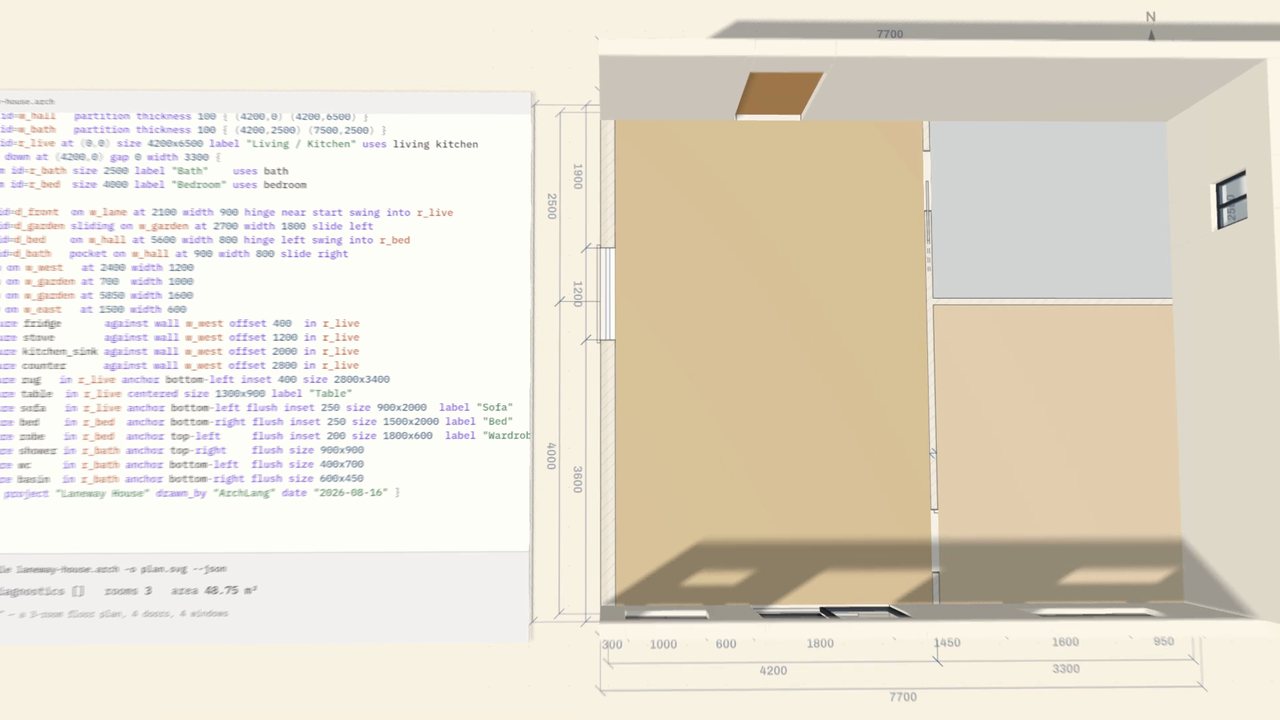
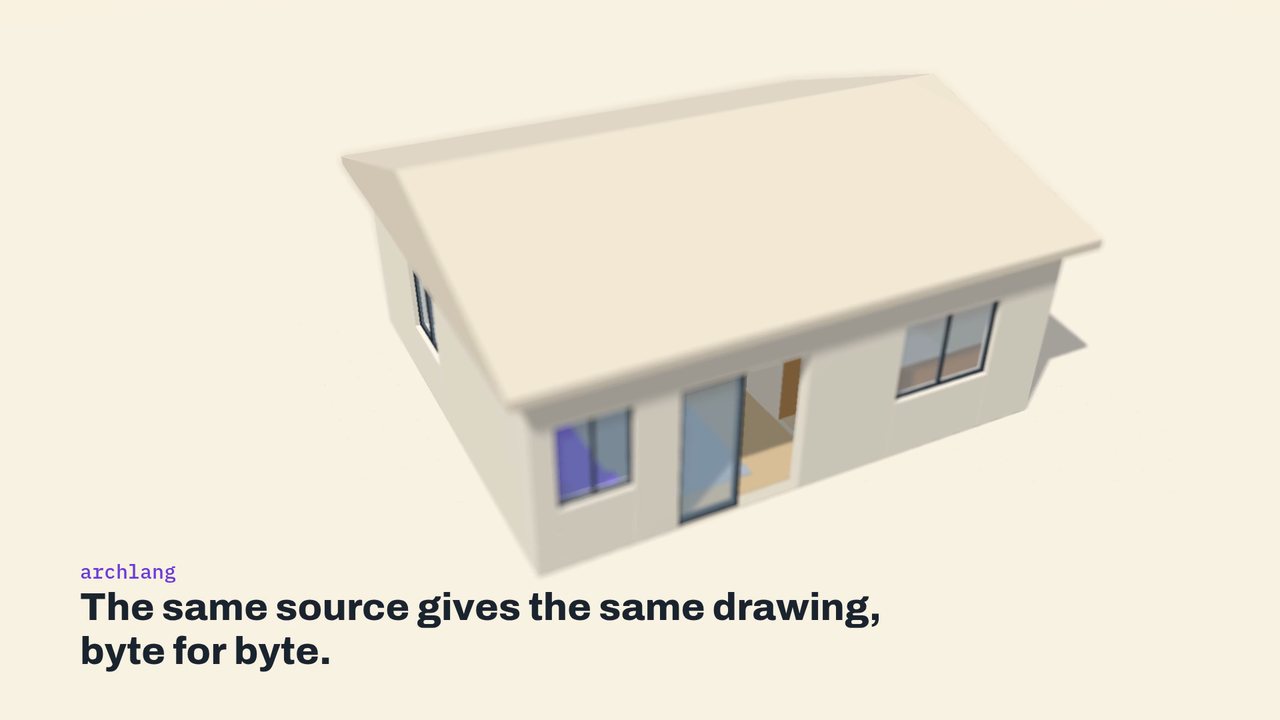
| 14 – 24 s | the plan lifts into a 3D house, the camera slides inside and lifts out, the roof lands on the beat, an aerial hold |
| 24 – 32 s | the house folds back into the plan, the logo draws, the slogan lands, and the closing chips appear |
2. Architecture: one beat table, two outputs#
The core idea is write the timing first. The tempo and a list of events are fixed before any picture or sound exists, and both the animation and the score are generated from that one table. That is why the sound follows the picture without any manual alignment.
The repository is small (MIT licensed):
src/comp.js            the composition: beat table, editor / plan / HUD drawing, camera, DOF, events, shutter
src/template.html      html shell + player UI (play / scrub)
src/entry.js           three.js + post-processing bundle entry (esbuild)
blender/build_house.py headless Blender to laneway_house.glb
audio/samplers.py      sample loading, pitch-resampling, velocity layers, multi-mic drums
audio/score.py         the score + mix to dist/soundtrack.wav
data/events.json       the beat table + 115 animation events
scripts/               build.py, render.py, dump_events.py, verify_sync.py, still.py, fetch_samples.sh, ...
Working with the assistant. The project started as a conversation. I described the film I wanted: a one-take promo for archlang with a 3D feel and real instruments. I also pointed it at the "one continuous take" method from onetake. The assistant first researched Blender and the tooling, installed it, and proposed this architecture. Only the method from onetake was followed. Its licence is PolyForm Noncommercial, so none of its code or assets went into the repository.
3. From archlang code to a plan#
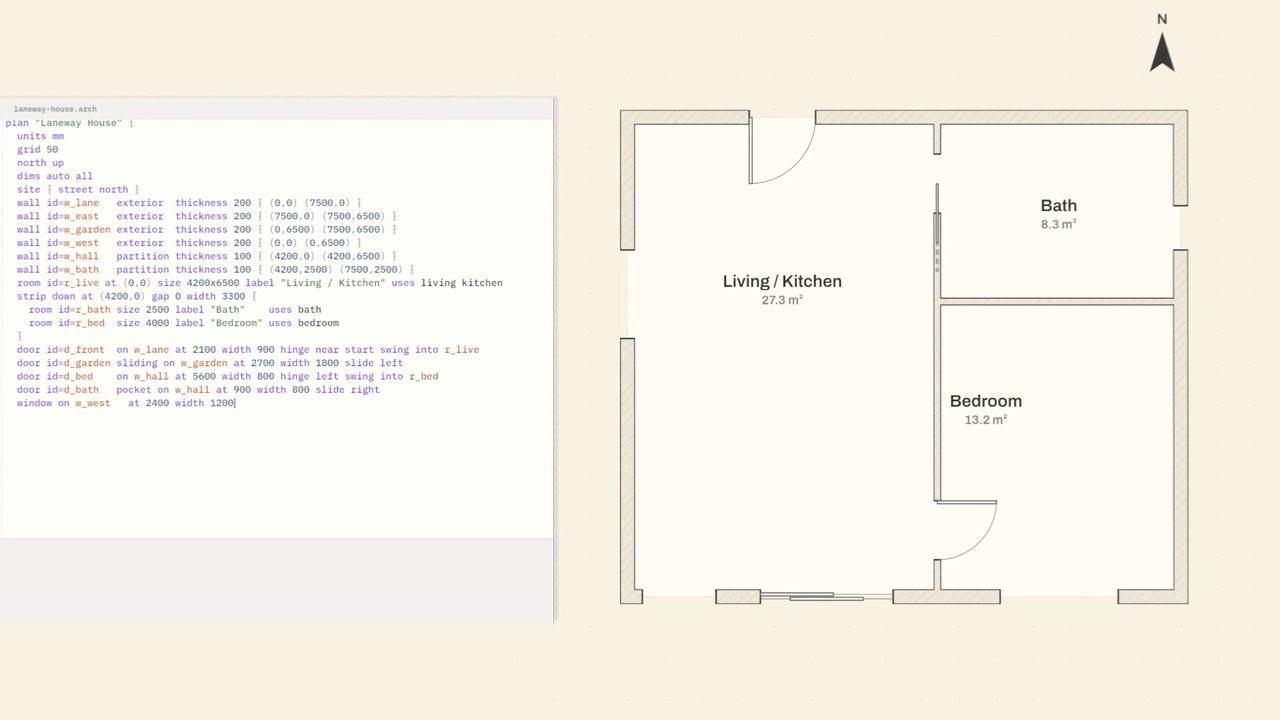
Nothing on screen is mocked up. The code typed in the editor is the real source of archlang's laneway-house example (comments and blank lines left out). The plan is the compiler's real SVG output for it:
npx -y @chanmeng666/archlang compile data/laneway-house.arch -o data/laneway-house.svgThe source starts like this:
plan "Laneway House" {
  units mm
  grid 50
  north up
  dims auto all
  site { street north }
  wall id=w_lane   exterior  thickness 200 { (0,0) (7500,0) }
  wall id=w_east   exterior  thickness 200 { (7500,0) (7500,6500) }
comp.js draws the SVG element by element. Each wall, room, door, window and piece of furniture has an id, and each id has a beat in the time table K, so the plan builds itself in rhythm:
const BPM = 120, BEAT = 60 / BPM, DUR = 32, FPS = 30;
const B = b => b * BEAT;   // beats to seconds

const K = {
  walls: { w_lane: 8, w_east: 9, w_garden: 10, w_west: 11, w_hall: 12, w_bath: 13 },
  rooms: { r_live: 14, r_bath: 14.5, r_bed: 15 },
  doors: { d_front: 16, d_garden: 16.5, d_bed: 17, d_bath: 17.5 },
  ...
  lift: 28, roofStart: 43, roofLand: 46, roofOff: 48, logo: 56, ...
};
Each typed line is stored with the beat its last character lands on, so typing also locks to the grid.
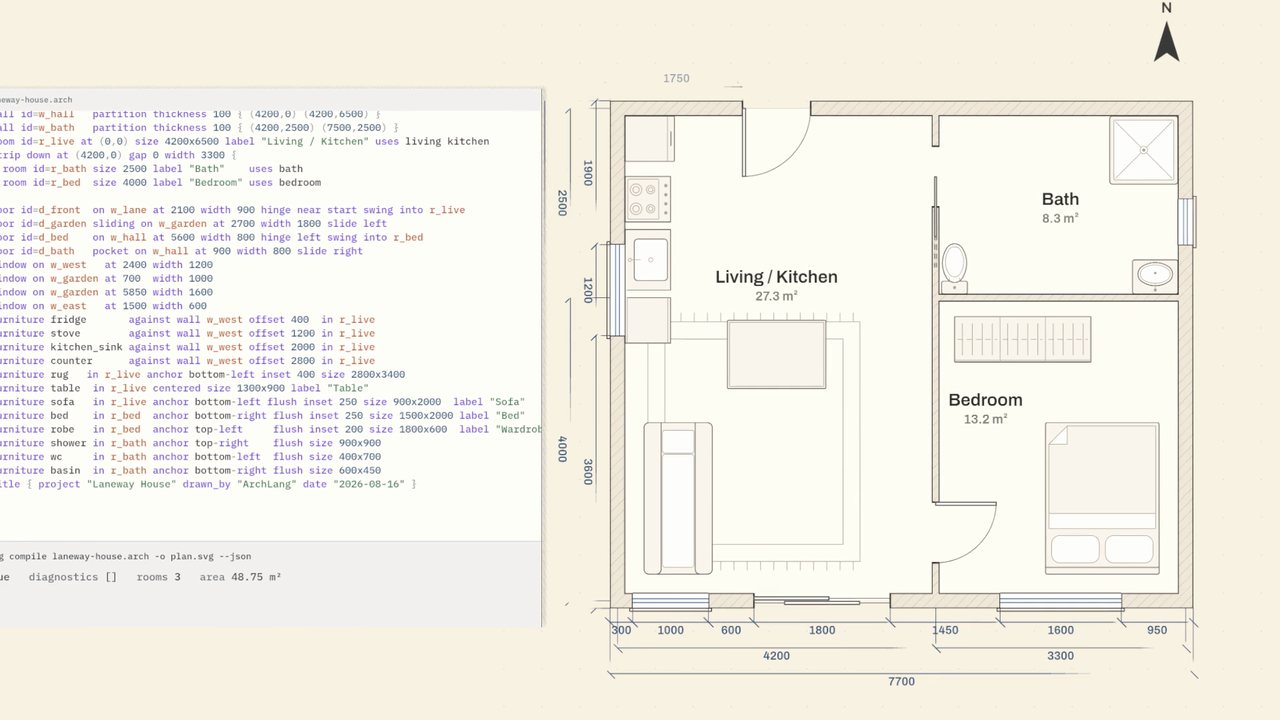
One honesty note matters here. archlang draws 2D. It outputs SVG, DXF, PDF and PNG. The 3D house in the film is an artistic extension built for the promo, not an archlang feature, and the film never claims otherwise.
4. Blender builds the house, and only the house#
blender/build_house.py runs headless and turns the plan into a 3D asset:
blender -b --factory-startup --python-exit-code 1 -P blender/build_house.py -- blender- Geometry comes from the plan. Walls, openings and furniture footprints are measured from the compiled SVG. Plan coordinates in mm (SVG, y-down) map to Blender metres as
X = x/1000, Y = -y/1000, with Z up. - Heights are authored in the script. A plan is a horizontal cut and carries no heights. Walls are
WALL_H = 2.7m. - One object per piece. Each piece is named for what it is (
wall_lane,door_front,furn_sofa, …). That lets three.js grow each piece separately on its own beat. - Export uses
bpy.ops.export_scene.gltf(... export_format='GLB', export_yup=True ...). The script also renders two Cycles preview PNGs (24 samples, denoised, CPU).
Blender does nothing else: no camera and no animation. All motion lives in the browser, where it can be a function of time. The step is deterministic, so re-running it reproduces the committed .glb byte for byte.
5. The one-take: everything is a function of time#
This is the part that makes a long, cut-free shot manageable. The page keeps no animation state. Every value (camera, focus, the height of each wall, the opacity of each label) is computed from t alone:
window.__seek = async function (t) { T_LAST = t; seekScene(t); drawFrame(); return t; };Any frame can therefore be rendered in any order, on any number of parallel workers, and re-rendered later with the same result. Random values come from a fixed-seed xorshift rng(seed), never Math.random().
Springs instead of keyframe easing#
Things that "land" on a beat use the closed-form step response of a damped spring. It overshoots a little and settles, and you can still evaluate it at any t:
function spring(tau, zeta = .55, om = 22) {          // damped spring step response 0→1
  if (tau <= 0) return 0;
  const wd = om * Math.sqrt(1 - zeta * zeta);
  return 1 - Math.exp(-zeta * om * tau) * (Math.cos(wd * tau) + (zeta * om / wd) * Math.sin(wd * tau));
}
For example, a wall rises once its beat has passed: rise[w] = t < tt ? 0 : spring(t - tt, .5, 17). The doors swing with a clamped spring, so they overshoot a little past 90° and settle back.
The camera path#
The camera is a list of keys (CAMKEYS), each with a time, eye, target, field of view and its own easing curve. The film opens with top-down keys built by a helper that turns "show W metres of plan" into an eye height for a 30° lens. It moves to a 3/4 view at 16 s, goes down to eye level (about 1.5 m, FOV 52–56) to slide through the rooms from 17 to 20.6 s, and lifts out with expoInOut to an aerial view. It returns to top-down at 26.2 s for the end card. Two touches on top of the interpolation make it feel shot rather than computed:
- A hand-held float. Sums of slow sines move eye and target a few centimetres. They fade out during the holds, so the held frames are rock-steady.
- A "punch" on landings. On each wall, room, door and lift hit, the camera leans in briefly towards its target, using the same spring plus a small decaying ring. The viewer feels the beat in the camera.
Depth of field as a rack focus#
Post-processing is three.js EffectComposer with BokehPass. The focus distance is not fixed. FOCKEYS lists a subject per beat, and the focus point springs from one subject to the next, so during the walk-through the focus racks to the room or object being shown. At the start an extra term racks the opening card into focus over the first second.
One self-contained html#
scripts/build.py inlines everything into dist/archlang-promo.html: the esbuild bundle of three.js (0.186.1) and its post-processing passes, the Blender .glb as base64, the compiled SVG, the archlang word-mark, the Archivo and IBM Plex Mono fonts, and, once it exists, the AAC soundtrack. One file with no network makes renders reproducible, and the same file doubles as the interactive version on the Release.
Working with the assistant. Most iterations were me watching a draft and replying in plain words, for example asking for a slower or steadier camera move, or a different framing. The pure-function design made each fix cheap. The assistant rendered stills at the exact seconds in question (
scripts/still.py 23.5,31.8) and showed them to me before committing to a full render. The final render log shows how that played out: after the first full pass, frames 618–790 were re-rendered twice to fix the aerial camera. The other frames did not need to be redone.
6. A score made from real instruments#
There are no synthesised instruments in the soundtrack. audio/score.py places recorded samples on the 120 BPM grid and mixes them with numpy and scipy. Two things are processing rather than recordings. The reverb impulse response is shaped noise, used only to convolve the recorded sounds. The two rising "whoosh" swells are a real crash cymbal played backwards.
| Library | Used for | Licence |
|---|---|---|
| Big Rusty Drums (Karoryfer Samplecraft) | the kit: kick, snare, hats, crash, ride bell, three toms; also the typing ticks (tom rim and stick clicks) and the reversed-crash swells | CC0 1.0 |
| Splendid Grand Piano (Akai) | chord comping Am – F – C – G, logo and slogan chords | public domain |
| Karoryfer × bigcat Cello | sustained pads, logo swell | CC0 1.0 |
| Karoryfer Meatbass | pizzicato upright bass line | CC0 1.0 |
| VCSL (Versilian Community Sample Library) | glockenspiel, vibraphone, claves for the grid, room, door, window, furniture and logo accents | CC0 1.0 |
| body_percussion | finger snaps on door events | CC0 1.0 |
The libraries are not committed. scripts/fetch_samples.sh fetches only the files used, at pinned commits, using a sparse, shallow, blobless git checkout:
git -C "samples/$name" sparse-checkout set "$@"
git -C "samples/$name" fetch -q --depth 1 --filter=blob:none origin "$sha"
The mix works like a small DAW written in Python:
- Sampler.
samplers.pypitch-shifts from the nearest recorded note by resampling (resample_poly). It picks velocity layers and blends the drum mics (close, overheads, snare bottom). Round-robin picks use a fixed seed. - Arrangement. Groove A (4–12 s) and groove B (14–22 s) have kick on 1 and 3, snare on 2 and 4 and eighth-note hats. There are tom fills into each section, a snare roll in 1/8 steps into the 14 s downbeat, and a four-on-the-floor build from 24 to 28 s. Everything crashes with a kick on the logo at 28 s.
- Bells from the picture. Glockenspiel, vibraphone, claves and snaps are placed at the times in
data/events.json. Each wall, door, window and piece of furniture that appears on screen gets its own note. - Mix bus. Bass, keys, strings and bells duck under the kick (sidechain from an envelope follower). Instruments are sent to a convolution reverb by stem. The bus is high-passed at 28 Hz, faded from 31 s, normalised to −16 LUFS with
pyloudnorm, and run through a look-ahead limiter with a −1.5 dBFS ceiling. - Determinism. With fixed seeds (
np.random.default_rng(20261023)), the same samples give a byte-identicalsoundtrack.wav. Every placed note is logged toaudio/mix_log.json.
Working with the assistant. The roughly 0.6–0.7 GB of sample libraries, Python with numpy, scipy and pyloudnorm in a uv-managed venv, Node 20 and ffmpeg all lived on the assistant's own cloud Linux computer. Nothing heavy ran on my laptop. A tip from this step: ask for the licence of every sample library before it is used, and ask for a credits file with pinned sources. One candidate library, Terkelsen Marimba, was evaluated and dropped because its licence was not clear enough for redistribution.
7. Proving that picture and sound line up#
"It looks in sync to me" is not a check. The page exposes its own event list (window.__events()), and scripts/dump_events.py writes it to data/events.json. That is the same file the score reads. scripts/verify_sync.py then checks it in three independent ways:
- Schedule check. Every timed event has a sound in the score's log at its exact time.
- Audio check. Onset detection runs on the rendered wav (high-passed log-energy flux) without looking at the score.
- Drum check. For events on the beat grid, it checks whether a drum hit happens at that exact time.
The published results for the 113 timed events:
- 113 / 113 have a sound scheduled at exactly their time (max deviation 0.0 ms). The mp4's audio cross-correlated against
soundtrack.wavgives a lag of 0 samples. - 72 / 113 have an independently detected onset within one frame (33 ms); the median distance is 2.5 ms. Most of the misses are soft typing ticks and quiet bells under the drums. They are scheduled, but a simple detector does not pick them out.
- 86 / 113 coincide with a drum hit at exactly the same time. Most of the rest fall in parts without drums (the first 4 s and the breath at 12.5 s).
The weaker numbers are reported too. They tell you which events you can see more clearly than you can hear.
8. Rendering: a browser as the camera, with a real shutter#
scripts/render.py drives headless Chrome through Playwright with software WebGL (SwiftShader), so no GPU is needed:
CHROME_ARGS = ['--use-gl=angle', '--use-angle=swiftshader', '--ignore-gpu-blocklist',
               '--enable-unsafe-swiftshader', '--no-sandbox']
Each worker opens the html with ?render&w=1920&h=1080 and pulls frame numbers from a shared queue. Because state is f(t), the workers never need to coordinate.
Motion blur is simulated inside the page. For a 180° shutter at 30 fps the shutter is open for 1/60 s. For a frame at time t the page seeks n times across that window and averages the captures on a 2D canvas, using globalAlpha = 1/(k+1) as a running mean:
window.__shutter = async function (t, n, open) {
  for (let k = 0; k < n; k++) {
    const tk = clamp(t + open * ((k + .5) / n - .5), 0, DUR - 1e-6); seekScene(tk); drawFrame();
    accCtx.globalAlpha = 1 / (k + 1); accCtx.drawImage(gl, 0, 0);
  }
  return acc.toDataURL('image/png');
};
n adapts to the motion. window.__nSamples projects scene points through the camera at the shutter's open and close times. It also compares a signature of everything else that moves. If nothing moves more than 0.6 px, the frame is captured once. Otherwise it uses ceil(pixels / 5) sub-frames, capped at 8. In the final render, 67 frames needed a single capture and 17 needed the full 8.
Then ffmpeg encodes:
ffmpeg -framerate 30 -i _frames/%05d.png -i soundtrack.wav \
  -c:v libx264 -preset medium -crf 16 -pix_fmt yuv420p -profile:v high -movflags +faststart \
  -c:a aac -b:a 256k -shortest archlang-promo.mp4
A full pass took about 36 minutes (2,139 s) on 3 workers on an 8-core, 16 GB machine. Renders can resume with --resume --keep.
Working with the assistant. Rendering ran as a long background job on the assistant's computer while I did other things. I could ask "how is it going?" at any time and get frame counts back. When something needed fixing, only the affected frame range was re-rendered.
9. Reproduce it yourself#
You need Python 3.13, Node 20, ffmpeg, git and Google Chrome (or Playwright's Chromium). Blender 5.x is only needed to rebuild the .glb, because a built copy is committed. No GPU is needed.
git clone https://github.com/ChanMeng666/archlang-promo-threejs.git && cd archlang-promo-threejs

python3 -m venv venv && . venv/bin/activate        # Windows: venv\Scripts\activate
pip install -r requirements.txt                    # numpy scipy soundfile pyloudnorm playwright
npm install                                        # three.js, esbuild, fonts
# to use Playwright's Chromium instead of installed Chrome:
#   playwright install chromium && export ARCHLANG_PROMO_CHANNEL=chromium

# 1. (optional) rebuild the inputs
npx -y @chanmeng666/archlang compile data/laneway-house.arch -o data/laneway-house.svg
blender -b --factory-startup --python-exit-code 1 -P blender/build_house.py -- blender

# 2. the single html (no audio yet) and the event table
python scripts/build.py --noaudio
python scripts/dump_events.py

# 3. the score
bash scripts/fetch_samples.sh
python audio/score.py                              # → dist/soundtrack.wav

# 4. check sync
python scripts/verify_sync.py

# 5. render: a 5-frame smoke test, then the film
python scripts/render.py --frames 0:5 --workers 2
python scripts/render.py --workers 3 --audio dist/soundtrack.wav

# 6. html with embedded audio + release folder with SHA256SUMS
bash scripts/make_release_assets.sh
For a quick draft use --w 1280 --h 720. To change the timing, edit K in src/comp.js, rebuild, run dump_events.py, and re-run score.py. The music follows the picture.
10. Pitfalls and lessons#
- Never keep animation state in the page. Once everything is
f(t), parallel rendering, resuming, re-rendering a range and taking stills all come for free. - Fix the beat table before the art. At 120 BPM and 30 fps a beat is exactly 15 frames, so beat times never fall between frames.
- Software WebGL is slow but portable, and pixels can differ slightly between machines. On the build machine, 4 of 5 frames re-rendered from the repo matched the released frames bit for bit. The fifth differed in 117 of 2,073,600 pixels.
- Motion tools that inspect the DOM cannot see inside a WebGL canvas. onetake's motion probe reported no tracked motion here, so continuity was checked by eye on extracted frames.
- Measure sync, and publish the weak numbers too.
- Nobody has listened to the final mix on studio monitors. Levels were set from stem measurements and loudness meters. Say so when that is the case.
11. How I ran the project with an AI desktop assistant#
I made this film by directing Grok Bot, an AI desktop assistant, in chat. Here is what that looked like in practice and what I would tell anyone trying it.
Planning and research in conversation. I described the outcome: a one-take promo, a 3D feel, real instruments, everything reproducible. The assistant researched Blender and the toolchain, then proposed the pipeline. My job was to make decisions, not to type commands.
Heavy work on its computer, not mine. The assistant has its own cloud Linux computer. Blender, Node, Python with uv, ffmpeg and the sample libraries were installed there. Headless rendering, encoding and audio mixing also ran there. My Windows laptop stayed free the whole time.
Long jobs in the background. Renders and file transfers ran for a long time while I did other things. When I asked "进度如何了?" ("how is it going?"), I got concrete progress: pieces or frames done, the time of the last write, and an estimate.
Delivery to my own machine, with my permission. Once I approved access to my Windows computer, the assistant copied the results there. It used my own git and gh to create the public repository archlang-promo-threejs and the v1.0.0 release with the mp4, html, soundtrack and SHA256SUMS.txt. It asked before risky steps such as git push. It also did not change my git configuration, even where it was wrong. It passed the right author for each commit and told me about the problem.
Practical limits, handled honestly. Copying files onto my computer is limited to about 12 MB per piece. To copy the full 2.3 GB working folder to D:\, the assistant split it into 182 pieces, copied them one at a time, and resumed from the last good piece when the connection dropped or my laptop slept. It checked the result with sha256 and file counts (6,230 files on both sides) and then cleaned up the temporary files. It took hours. When I asked why the folder was so big, it broke the size down: the project itself is about 34 MB, and most of the rest was the full sample-library clones and intermediate frames. Then it let me choose what to copy.
Tips if you try this:
- Phrase the outcome and the constraints, not the steps. "One continuous shot, real instruments only, CC0 licences, reproducible from the repo" worked better than prescribing tools.
- Ask for evidence. Ask for stills at exact timestamps, a sync report with numbers, loudness figures, and checksums for anything copied or released.
- Ask for honest notes. Ask what is not verified. Here that included the studio-monitor listening test and render determinism across machines.
- Keep your approval on the irreversible steps: pushing, publishing and changes to your own machine.
- Iterate in plain language and scope the fix. "Fix the aerial shot" became a re-render of frames 618–790, not the whole film.
Credits and licences#
The project's code is MIT. The sample libraries are CC0 1.0 or public domain, fetched at pinned commits and not redistributed. Only the mixed soundtrack is. three.js is MIT, Blender is GPL (it only builds the geometry), the fonts are SIL OFL 1.1, and archlang is MIT. onetake (PolyForm Noncommercial 1.0.0) contributed only its method. Full details are in CREDITS.md.
- Repository: github.com/ChanMeng666/archlang-promo-threejs
- Release v1.0.0: film, interactive html, soundtrack, checksums
- archlang: github.com/ChanMeng666/archlang